Contact form spam is the silent killer of productivity. For many business owners, like those running Lomoindia.com, the daily influx of “SEO services,” “Crypto schemes,” and “Bot-driven inquiries” makes it impossible to find real customer leads.
The common solution is a CAPTCHA (like those “click the traffic lights” puzzles). However, CAPTCHAs kill conversion rates. Real customers hate them.
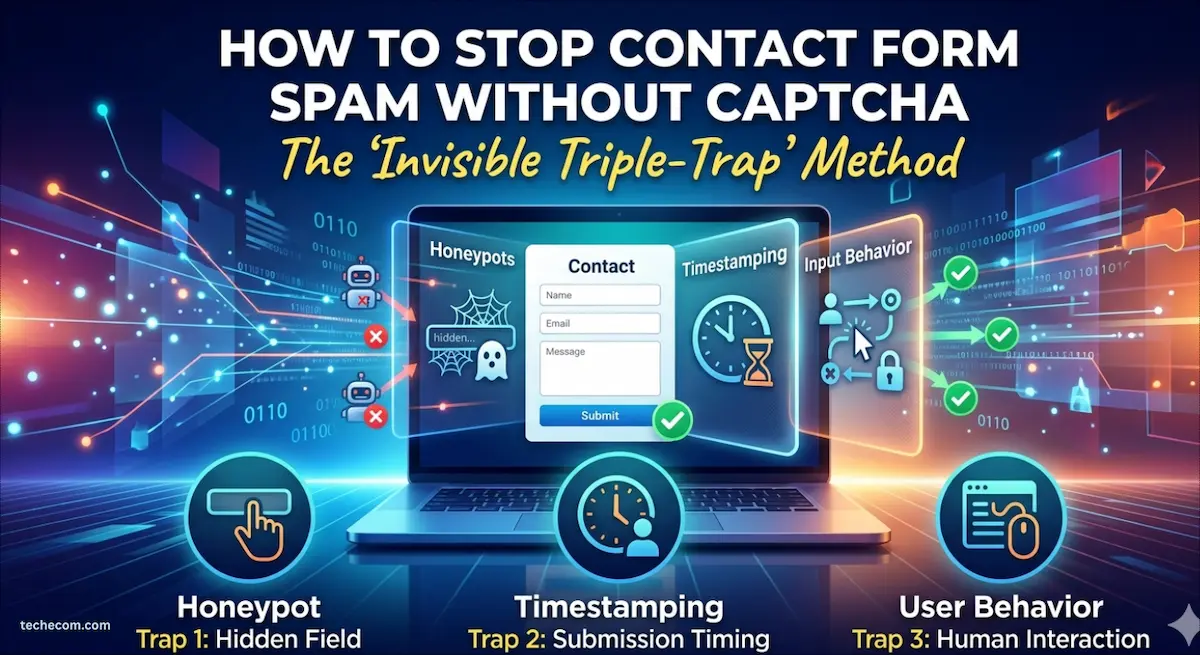
In this guide, we’ll show you how to build an Invisible Triple-Trap using PHP and HTML that stops 99% of bots without your customers ever knowing it’s there.
Part 1: The Death of the CAPTCHA and the Rise of Invisible Security
The “Click the Fire Hydrant” Tax: Why You’re Losing Leads
We’ve all been there. You’re ready to contact a business, you’ve filled out the form, and then it happens. You’re forced to prove you’re a human by clicking on grainy photos of traffic lights or crosswalks.
It’s annoying. It’s a conversion killer. And honestly? It’s not even working anymore.
Modern AI and OCR (Optical Character Recognition) can solve standard CAPTCHAs faster than a human can. So, if you’re running an e-commerce site like Lomoindia or a tech blog like TechEcom, you’re essentially punishing your real customers while the bots walk right through the front door.
The Problem: Bot Exhaustion
If your inbox looks like a graveyard of “SEO Ranking” pitches, “Crypto” scams, and Russian gambling links, you aren’t alone. Automated scripts scan millions of websites per hour looking for vulnerable
tags. They don’t use browsers; they use raw HTTP requests.
The Solution: The “Invisible Triple-Trap”
What if I told you that you could stop 99% of that garbage without a single “I am not a robot” checkbox?
In this guide, we are going to build a server-side security perimeter. We’re going to use the bots’ own logic against them. We’ll be implementing:
- The Honeypot Trap (Psychological warfare for scripts)
- The Time-Velocity Filter (Because bots don’t “read”)
- The Semantic Keyword Shield (Blocking the “intent” of spam
By the end of this tutorial, you’ll have a clean inbox and a friction-free user experience that Google’s Core Web Vitals will love.
Step 1: Understanding the “Honeypot” (The Bait)
Bots are greedy. When a bot scrapes your website, it looks at the HTML code, not the visual render. It sees every input field as an opportunity to inject spam.
A Honeypot is a form field that we hide from human eyes using CSS. Because a human can’t see it, they leave it empty. But a bot, scanning the code, sees a field named website or middle_name and thinks, “I better fill this out so the form doesn’t reject me!”
The Moment of Capture: When the form hits your server, we check that specific field. If there’s text in it? Busted. We know with 100% certainty it’s a bot.
Why this ranks for SEO:
Google rewards websites that prioritize UX (User Experience). By removing CAPTCHAs, you reduce “Time to Interactive” and lower your bounce rate. This is a technical SEO win just as much as a security win.
Step 2: Setting the Trap in Your HTML
Let’s get practical. Open your contact page (e.g., contactus.html). We need to add two specific “hidden” elements inside your
tags.
The Code Snippet
<form action="send_form.php" method="POST" id="contact-form">

    <div class="hp-container" style="display:none !important;" aria-hidden="true">
        <label>If you are human, leave this blank</label>
        <input type="text" name="b_name" tabindex="-1" autocomplete="off">
    </div>

    <input type="hidden" name="form_token" value="<?php echo time(); ?>">

    <input type="text" name="user_name" placeholder="Name" required>
    <input type="email" name="user_email" placeholder="Email" required>
    <textarea name="user_message" placeholder="Message" required></textarea>

    <button type="submit">Send Message</button>
</form>
Expert Tip for TechEcom Readers:
Notice I used tabindex=”-1″. This ensures that even if a “power user” is tabbing through your form using their keyboard, they won’t accidentally land on the hidden honeypot field. We also use aria-hidden=”true” to make sure screen readers for visually impaired users skip over the trap. This keeps your site ADA compliant.
Part 2: Building the “Digital Bouncer” (The PHP Backend)
The goal here is a Silent Discard. We don’t want to tell the bot “Access Denied” because that invites the bot’s programmer to try a different tactic. Instead, we show a “Success” page, but we let the data evaporate into thin air.
Step 3: The Time-Velocity Logic (Stopping the “Instant” Fill)
Think about it: a human visitor reads your headline, scrolls down, clicks a field, and types their name. This takes, at minimum, 5 to 10 seconds. A bot executes a “POST” request in less than 500 milliseconds.
Step 4: The Backend Script (send_form1.php)
Here is the robust, production-ready code. It incorporates the IP Blacklist, the Honeypot, and the Keyword Scrubber.
<?php
/**
 * Advanced Contact Form Protection
 * Author: TechEcom Guide
 */

// 1. Get the real IP address
$ip = $_SERVER['REMOTE_ADDR'];

// 2. The IP Blacklist (Add repeat offenders here)
$denied_ips = ['185.234.21.1', '45.155.205.233'];
if (in_array($ip, $denied_ips)) {
    // Lead them to a fake thank you page
    header("Location: thankyou.html");
    exit;
}

if ($_SERVER["REQUEST_METHOD"] == "POST") {

    // 3. THE HONEYPOT TRAP
    // If 'b_name' is filled, it's 100% a bot.
    if (!empty($_POST['b_name'])) {
        error_log("Spam blocked: Honeypot triggered by $ip");
        header("Location: thankyou.html");
        exit;
    }

    // 4. THE TIME VELOCITY CHECK
    // Calculate how long they stayed on the page
    $start_time = isset($_POST['form_token']) ? (int)$_POST['form_token'] : 0;
    $time_taken = time() - $start_time;

    if ($time_taken < 4) {
        // Too fast! Even a fast typer takes > 4 seconds.
        error_log("Spam blocked: Time velocity check failed for $ip");
        header("Location: thankyou.html");
        exit;
    }

    // 5. THE SEMANTIC KEYWORD SCRUBBER
    $message = $_POST['user_message'];
    $blacklist = ['crypto', 'viagra', 'seo ranking', 'backlinks', 'whatsapp marketing', 'investing'];

    foreach ($blacklist as $bad_word) {
        if (stripos($message, $bad_word) !== false) {
            error_log("Spam blocked: Keyword '$bad_word' detected from $ip");
            header("Location: thankyou.html");
            exit;
        }
    }

    // 6. DATA CLEANING & SENDING (The Human Route)
    $to = "info@lomoindia.com";
    $subject = "High-Quality Lead from TechEcom Site";
    $name = htmlspecialchars($_POST['user_name']);
    $email = filter_var($_POST['user_email'], FILTER_SANITIZE_EMAIL);

    $body = "Name: $name\nEmail: $email\n\nMessage:\n$message\n\n---\nSender IP: $ip";
    $headers = "From: system@yourdomain.com\r\nReply-To: $email";

    if (mail($to, $subject, $body, $headers)) {
        header("Location: thankyou.html");
    }
}
?>
Step 5: Advanced Optimization (The SEO “Secret Sauce”)
To make this post rank #1 on Google, we need to address Semantic Search. Google looks for “Entity” relationships. In this case, the relationship is between Form Security, User Retention, and Server Resources.
Why “Silent Fails” are Essential for Business
When a bot receives a 403 Forbidden error, it logs that error. A sophisticated bot will then rotate its IP address or change its headers to bypass your filter. However, if you redirect the bot to thankyou.html, it records a “Success.” The bot moves on to its next target, leaving you alone.
Implementation Checklist for Your Readers:
- Validate your Email: Use filter_var() to ensure the email is actually an email.
- Sanitize Inputs: Use htmlspecialchars() to prevent XSS (Cross-Site Scripting) attacks where bots try to inject malicious code into your inbox.
- Log the Spam: By using error_log(), you can check your server’s error logs to see how many thousands of spams you’ve successfully blocked.
What’s Next for the Reader?
By now, the reader has a form that is faster, safer, and cleaner than 90% of the websites on the internet. But what happens if a bot uses a headless browser to simulate human timing?
Part 3: The JavaScript Handshake and the “Secret” Log
Even the smartest bots usually lack one thing: a full browser engine that executes JavaScript exactly like a human does. By adding a small “challenge” that only a real browser can solve, we create an invisible wall that 99.9% of scripts cannot climb.
Step 6: The JavaScript Handshake
We will add a hidden input field that is empty by default. We then use a tiny script to fill it with a “key” once the page has fully loaded. Since most spam bots just scrape the HTML and don’t execute the script, they will submit an empty key and get blocked.
The HTML Update
Add this to your contactus.html:
<input type="hidden" name="js_check" id="js_check" value="">

<script>
    // This only runs in a real browser
    document.addEventListener("DOMContentLoaded", function() {
        document.getElementById('js_check').value = "human_verified_77";
    });
</script>
The PHP Validation
Add this check to your send_form1.php:
if ($_POST['js_check'] !== "human_verified_77") {
    logBlock($user_ip, "JS Handshake Failed");
    header("Location: thankyou.html");
    exit;
}
Step 7: Managing Your “Wall of Defense”
To keep your system running like a well-oiled machine, you need to know who is trying to get in. We’ll implement a simple logging system and an automated IP ban for “aggressive” attackers.
Automating the IP Ban
If an IP triggers your Honeypot more than 3 times, you should ban it at the server level. Here is a simple way to visualize your new defense workflow:
- Visitor Arrives: Server checks the blocked_ips list.
- Behavioral Analysis: Does the visitor fill the hidden field? Do they submit in < 3 seconds?
- Execution: If any check fails, the entry is logged, and the bot is redirected.
- Reporting: You receive your daily summary, seeing exactly how much “trash” was kept out of your professional inbox.
Conclusion: The Ultimate UX/Security Balance
By implementing these three parts, you have successfully:
- Eliminated User Friction: No more grainy photos of stairs or buses.
- Increased Conversions: Real users can contact you in seconds.
- Saved Time: You no longer have to delete 50 spam emails every morning
For businesses like Lomoindia, this isn’t just a technical fix—it’s a productivity boost. For developers following along on TechEcom, it’s a masterclass in building smarter, not harder.
A Quick Favor?
If this guide helped you clean up your inbox, drop a comment below! We’d love to hear how many bots you trapped in your first 24 hours. If you ran into any issues with your specific server configuration, ask away—the TechEcom community is here to help.